 最后编辑:2026-04-01
- 资源介绍

网盘截图:
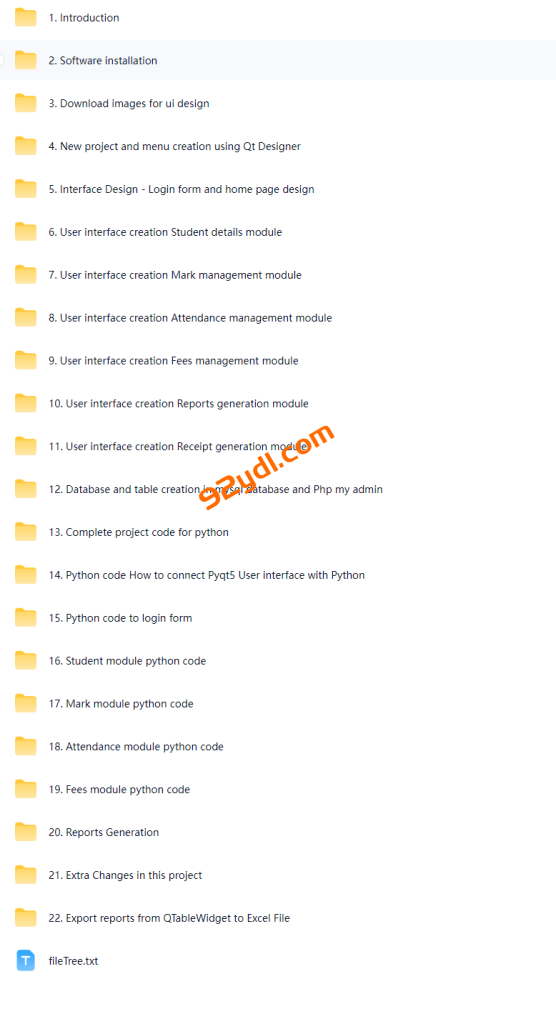
课程目录:
│  fileProcess.log
│  fileTree.txt
│  ReNameTree.bat
│
├─1. Introduction
│      1. The complete output of the Python PyQt5 & MySql project we are goint go develop.mp4
│      1. The complete output of the Python PyQt5 & MySql project we are goint go develop.srt
│      1. The complete output of the Python PyQt5 & MySql project we are goint go develop_CN.srt
│
├─10. User interface creation  Reports generation module
│      1. Report generation.mp4
│      1. Report generation.srt
│      1. Report generation_CN.srt
│
├─11. User interface creation  Receipt generation module
│      1. Receipt generation.mp4
│      1. Receipt generation.srt
│      1. Receipt generation_CN.srt
│
├─12. Database and table creation in mysql database and Php my admin
│      1. How to create school database in mysql using phpmyadmin control panel.mp4
│      1. How to create school database in mysql using phpmyadmin control panel.srt
│      1. How to create school database in mysql using phpmyadmin control panel_CN.srt
│      2. How to create student, mark, attendance and fees tables in school database.mp4
│      2. How to create student, mark, attendance and fees tables in school database.srt
│      2. How to create student, mark, attendance and fees tables in school database_CN.srt
│
├─13. Complete project code for python
│      1. Copy the complete python code - copy the complete code and save as school.py.html
│
├─14. Python code  How to connect Pyqt5 User interface with Python
│      1. Connect ui to python code.mp4
│      1. Connect ui to python code.srt
│      1. Connect ui to python code_CN.srt
│
├─15. Python code to login form
│      1. Login form.mp4
│      1. Login form.srt
│      1. Login form_CN.srt
│
├─16. Student module python code
│      1. Add student part 1.mp4
│      1. Add student part 1.srt
│      1. Add student part 1_CN.srt
│      2. Add student 2.mp4
│      2. Add student 2.srt
│      2. Add student 2_CN.srt
│      3. edit student 1.mp4
│      3. edit student 1.srt
│      3. edit student 1_CN.srt
│      4. Edit student part 2.mp4
│      4. Edit student part 2.srt
│      4. Edit student part 2_CN.srt
│      5. Delete student.mp4
│      5. Delete student.srt
│      5. Delete student_CN.srt
│
├─17. Mark module python code
│      1. Add marks.mp4
│      1. Add marks.srt
│      1. Add marks_CN.srt
│      2. Edit marks.mp4
│      2. Edit marks.srt
│      2. Edit marks_CN.srt
│      3. Delete marks.mp4
│      3. Delete marks.srt
│      3. Delete marks_CN.srt
│
├─18. Attendance module python code
│      1. Add attendance.mp4
│      1. Add attendance.srt
│      1. Add attendance_CN.srt
│      2. Edit attendance.mp4
│      2. Edit attendance.srt
│      2. Edit attendance_CN.srt
│      3. Delete Attendance.mp4
│      3. Delete Attendance.srt
│      3. Delete Attendance_CN.srt
│
├─19. Fees module python code
│      1. Addd Fees.mp4
│      1. Addd Fees.srt
│      1. Addd Fees_CN.srt
│      2. Fees Receipt Generation.mp4
│      2. Fees Receipt Generation.srt
│      2. Fees Receipt Generation_CN.srt
│      3. Edit fees.mp4
│      3. Edit fees.srt
│      3. Edit fees_CN.srt
│      4. Delete Fees.mp4
│      4. Delete Fees.srt
│      4. Delete Fees_CN.srt
│
├─2. Software installation
│      1. How to install Python.mp4
│      1. How to install Python.srt
│      1. How to install Python_CN.srt
│      2. How to install PyQt5 and PyQt5 tools.mp4
│      2. How to install PyQt5 and PyQt5 tools.srt
│      2. How to install PyQt5 and PyQt5 tools_CN.srt
│      3. How to install xampp and mysql.mp4
│      3. How to install xampp and mysql.srt
│      3. How to install xampp and mysql_CN.srt
│      4. How to install text editor for our project.mp4
│      4. How to install text editor for our project.srt
│      4. How to install text editor for our project_CN.srt
│
├─20. Reports Generation
│      1. Reports Generation.mp4
│      1. Reports Generation.srt
│      1. Reports Generation_CN.srt
│      2. Report Design Style Generation.mp4
│      2. Report Design Style Generation.srt
│      2. Report Design Style Generation_CN.srt
│
├─21. Extra Changes in this project
│      1. Extra changes.mp4
│      1. Extra changes.srt
│      1. Extra changes_CN.srt
│
├─22. Export reports from QTableWidget to Excel File
│      1. Export to Excel from Pyqt5 tables.mp4
│      1. Export to Excel from Pyqt5 tables.srt
│      1. Export to Excel from Pyqt5 tables_CN.srt
│      2. Download the modified python code.html
│      3. The modified Gui for export to excel.html
│
├─3. Download images for ui design
│      1. Right click on each image - select - save image as -  and save it.html
│      2. Complete ui file code - copy the contents of the code and save as school.ui.html
│
├─4. New project and menu creation using Qt Designer
│      1. How to create new project and menu.mp4
│      1. How to create new project and menu.srt
│      1. How to create new project and menu_CN.srt
│      2. How to set menu colors and object names in the menu.mp4
│      2. How to set menu colors and object names in the menu.srt
│      2. How to set menu colors and object names in the menu_CN.srt
│
├─5. Interface Design - Login form and home page design
│      1. Login form creation.mp4
│      1. Login form creation.srt
│      1. Login form creation_CN.srt
│      2. Home page creation.mp4
│      2. Home page creation.srt
│      2. Home page creation_CN.srt
│
├─6. User interface creation  Student details module
│      1. Add new student interface design.mp4
│      1. Add new student interface design.srt
│      1. Add new student interface design_CN.srt
│      2. Edit or Delete student interface design.mp4
│      2. Edit or Delete student interface design.srt
│      2. Edit or Delete student interface design_CN.srt
│
├─7. User interface creation  Mark management module
│      1. Add mark details.mp4
│      1. Add mark details.srt
│      1. Add mark details_CN.srt
│      2. Edit or delete mark details design.mp4
│      2. Edit or delete mark details design.srt
│      2. Edit or delete mark details design_CN.srt
│
├─8. User interface creation  Attendance management module
│      1. Add attendance Details.mp4
│      1. Add attendance Details.srt
│      1. Add attendance Details_CN.srt
│      2. Edit or delete attendance details.mp4
│      2. Edit or delete attendance details.srt
│      2. Edit or delete attendance details_CN.srt
│
└─9. User interface creation  Fees management module
        1. Add fees details form.mp4
        1. Add fees details form.srt
        1. Add fees details form_CN.srt
        2. Edit or delette fees form.mp4
        2. Edit or delette fees form.srt
        2. Edit or delette fees form_CN.srt
猜你喜欢
-
体系课-C++中高级工程师|完结
2026-03-21 -
王道C++长期班43期|2023完结
2023-09-19 -
C++相关⾼频经典⾯试题100问
2024-08-23 -
于振南-十天登顶嵌入式C语言之巅(高手C)
2025-04-08 -
WebRTC多对多音视频会议(react/express/socketIO/webRTC)
2025-02-22 -
C++项目-MySql核心讲解-深入索引、事务和锁,主从复制读写分离
2023-11-14 -
Android音视频图像处理NDK开发专家班|价值4980
2024-08-14 -
C++基础与深度解析2025|高清完整
2026-03-21 -
C++项目-手写C++ Muduo网络库项目-掌握高性能网络库实现原理
2023-11-14 -
从0手写自己的Linux x86操作系统(李述铜)
2024-04-10
-
C++11视频课程|完结238集力作|超详细
2023-11-08 -
C++语言基础到进阶
2024-08-29 -
远控项目
2025-01-09 -
算法设计与编程实践—基于leetcode的企业真题库
2025-05-14 -
C++64位游戏软件安全/汇编与反汇编/反调试,游戏外挂原理视频课程(82G) 价值1868
2024-03-11 -
2025王道C++第58期
2024-11-22 -
吴师兄学算法pdf文档
2024-09-05 -
夏曹俊C++ 设计模式理论与实战大全
2024-04-28 -
鑫路历程C++线下培训班|价值20000元
2024-01-05 -
2022多游|OpenGL全栈|完结高清|独家精品
2022-11-11
猜你在找
常见问题FAQ
- 视频加密吗?
- 无密,本站视频全部为超清无密MP4格式
- 怎么发货?
- 课程没更新完怎么办?
- 有问题怎么解决?